Advanced Project Estimation

From bid package to priced proposal

Powered by AI

Transform hours of manual estimation into minutes and generate accurate, competitive bids that win jobs while eliminating costly errors and guesswork.

  • 30-day Free Trial
  • No Credit Card Required
  • Cancel Anytime
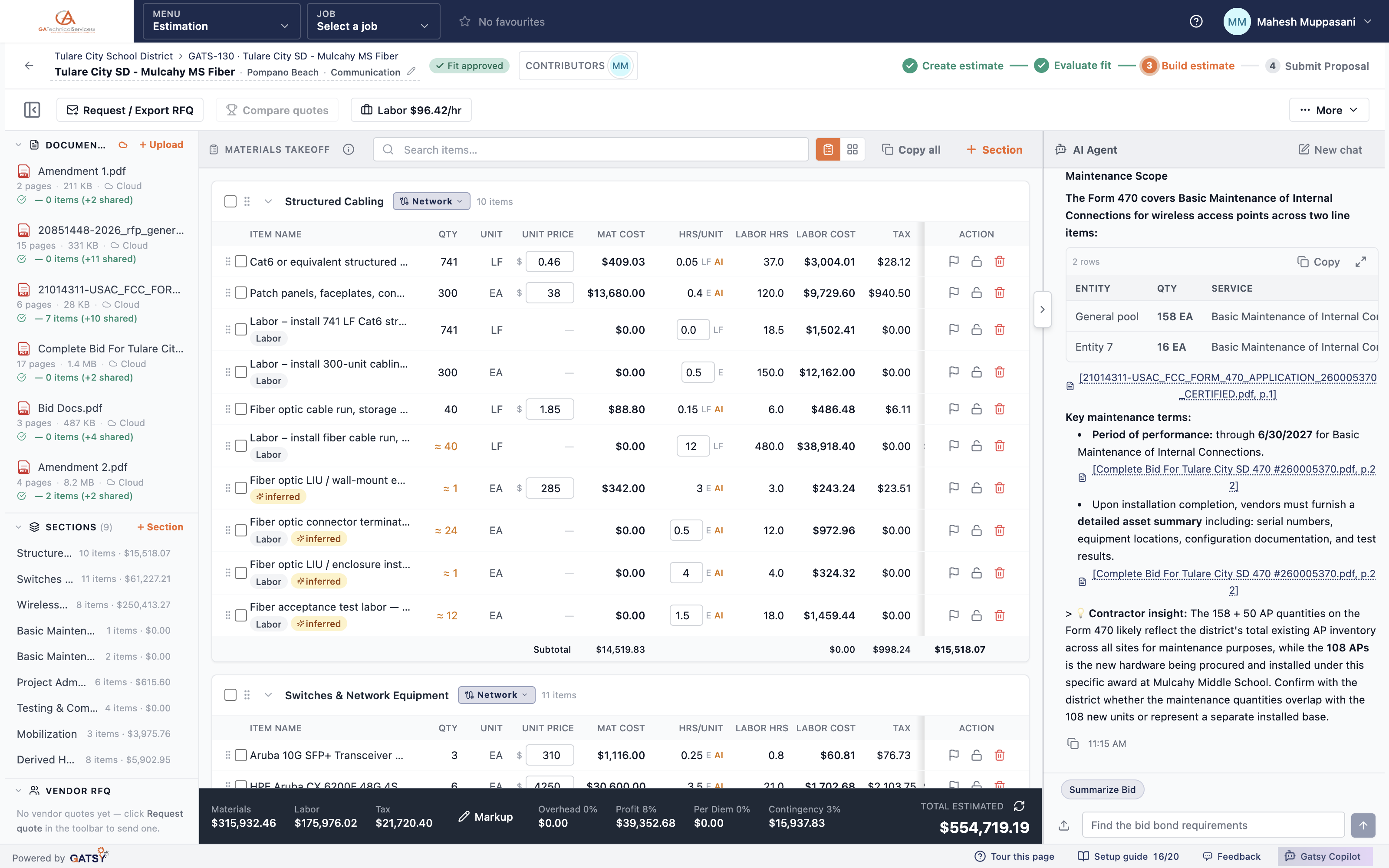
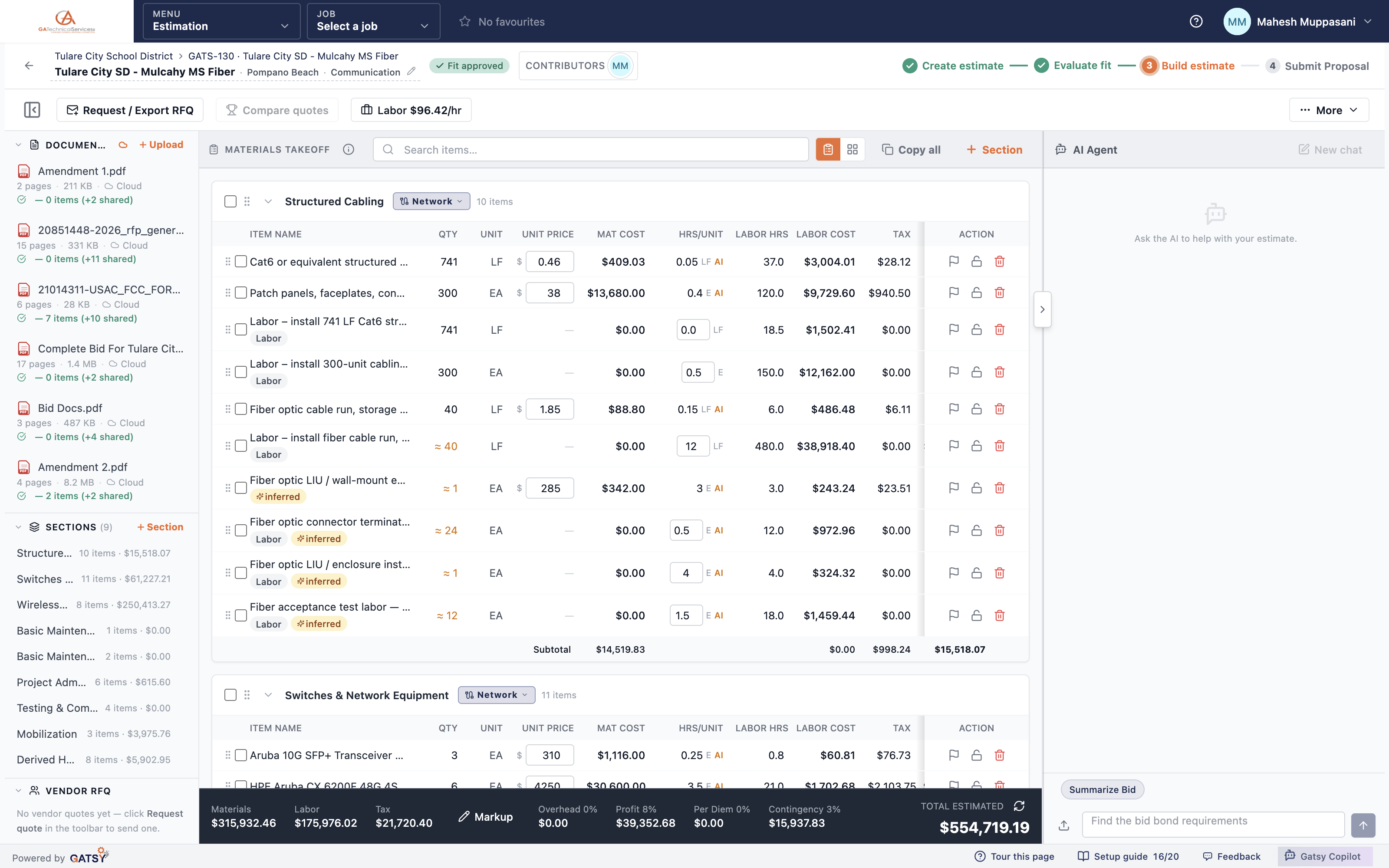
The estimating workspace: documents, a trade-grouped takeoff with labor and markup, and the AI agent panel
Reads specs and drawings
OCR + VisionReads specs and drawings
Create, evaluate, build, submit
4 StepsCreate, evaluate, build, submit
RFQs from inside the estimate
Your VendorsRFQs from inside the estimate
Free trial, no credit card
30 DaysFree trial, no credit card

Nine steps you would have done by hand

Every stage below is something the workspace runs for you, in order, on the documents you uploaded.

  1. Bid Package
  2. Docs & Plans — OCR on specs, schedules and tables. Vision on the drawings.
  3. Company Fit — Scope checked against what your company is qualified to do.
  4. Extract Materials
  5. Extract Quantities
  6. Vendor RFQs
  7. Profit and markup — Overhead, profit, tax and per diem applied to the priced takeoff.
  8. Build Proposal
  9. Bid Result

How It Works

  1. 1

    Create the Project

    Upload the RFP, drawings, spec sheets and cost forms — OCR reads the text and tables, vision reads the drawings

  2. 2

    Evaluate the Fit

    Before you spend a day estimating, GATSY checks the scope against your company qualifications and tells you whether to bid

  3. 3

    Build the Estimate

    Materials come out grouped by section and trade with labor hours attached — you set prices or send RFQs to your vendors

  4. 4

    Submit the Proposal

    Apply markup, overhead, profit and tax, then send the finished bid

Six things it does before you touch a number

  • Reads the package

    RFP, specs, schedules, drawings

  • Calls bid / no-bid

    Against your own quals

  • Counts & measures

    Straight off the sheets

  • Prices the takeoff

    Quantities, rates, labor hours

  • Answers with the page

    Every answer cited

  • Learns your numbers

    Sharper every bid

An estimating workspace that reads the bid package — and learns your business

Drop in the RFP, the drawings, the spec sections and the cost proposal form. GATSY reads all of it, hands back a trade-grouped takeoff with labor hours attached, and keeps the totals live while you price. The more bids you run through it, the sharper it gets on your markups, labor rates and material costs.

What the estimating workspace does

Reads the Whole Bid Package

OCR and vision takeoff, both in the free trial

OCR pulls quantities out of specs, schedules and BOM tables. Vision takeoff counts and measures straight off the drawings. A 200-page appendix is a normal afternoon, not a reason to no-bid.

  • OCR for specs, schedules and BOM tables
  • Vision-based takeoff from drawings
  • Pick which sheets get read, so you only pay for what matters
  • Per-document extraction status while it works
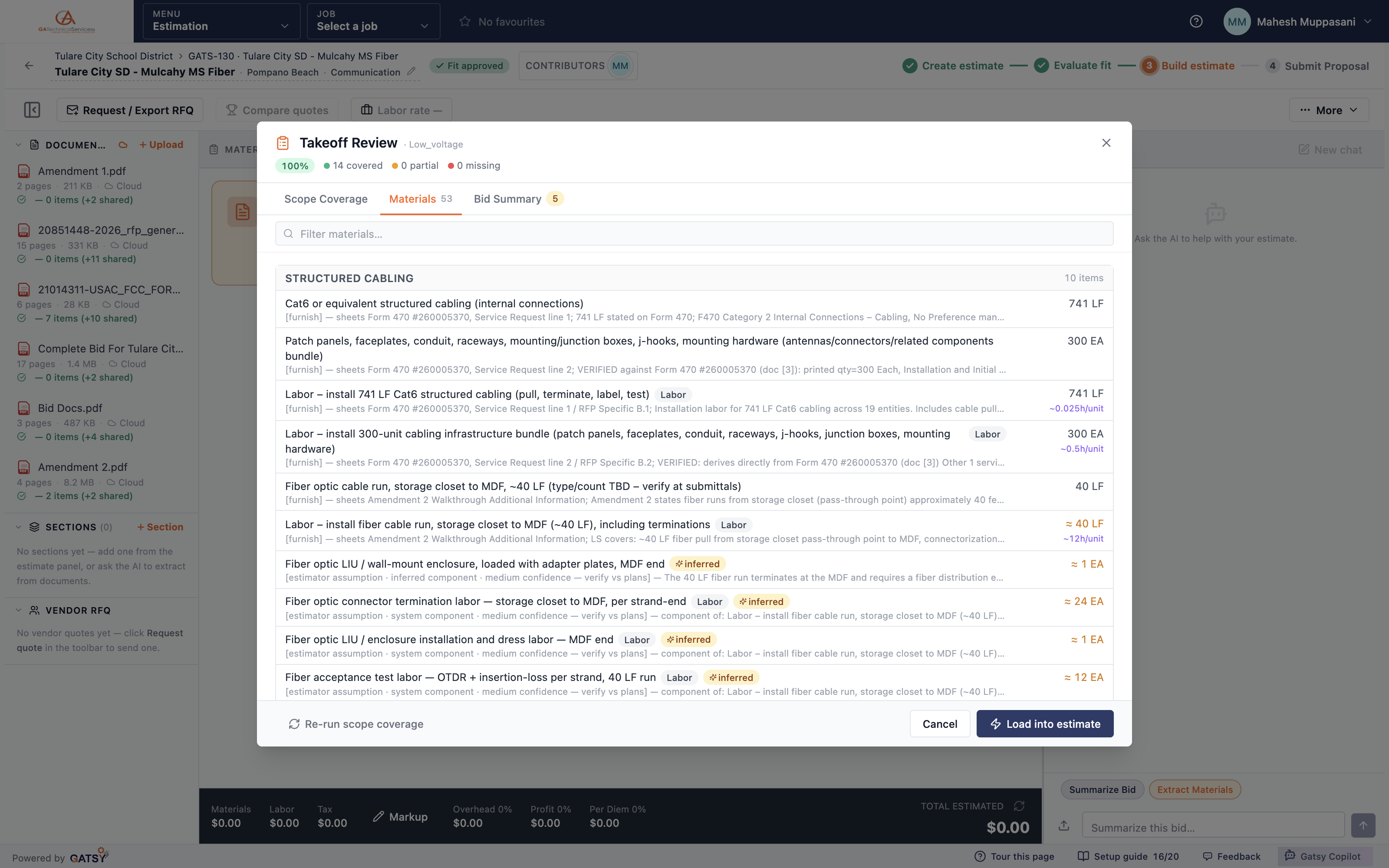
Extracted materials listed with the sheet and line each one was read from, with inferred items marked

Know Before You Spend a Day Estimating

Bid / no-bid fit check

Before you build anything, GATSY compares the scope against your company qualifications and comes back with a recommendation, the matches it found, and the gaps it is worried about. You record the call and move on.

  • Scored against your own qualifications, not a generic profile
  • Proceed, proceed with caution, or do not proceed
  • Gaps and warnings called out with the requirement behind them
  • Skip it when you already know the job
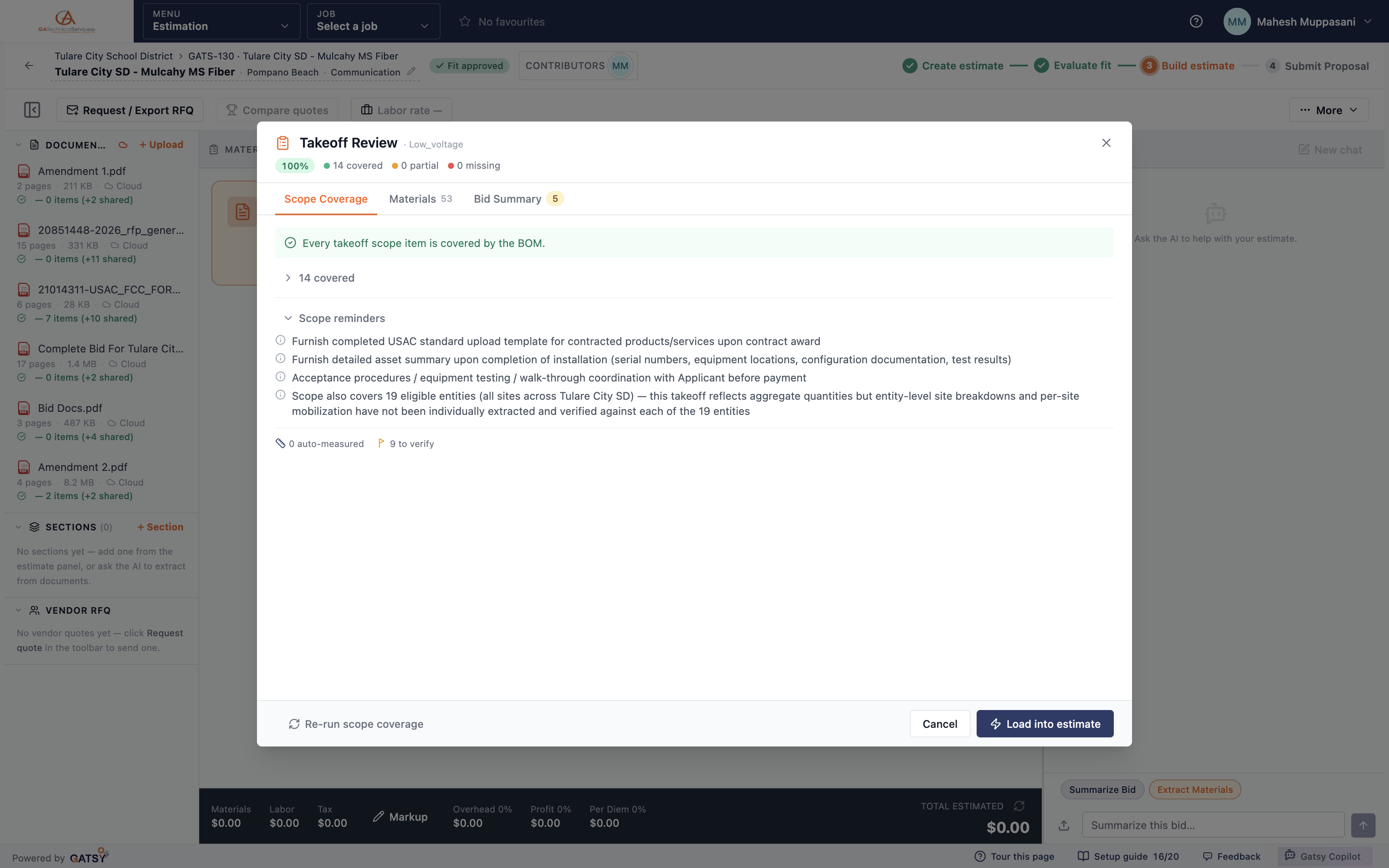
Takeoff review showing 100% scope coverage, 14 requirements covered and the scope reminders

Your Prices, Your Vendors

Price it yourself or let the quotes come to you

Materials land grouped by section and trade with labor hours already attached. Enter your own unit prices, or send RFQs to your vendors without leaving the estimate, then compare what comes back and award it.

  • Trade-grouped sections with labor hours per line
  • Send RFQs by email or export them as a PDF
  • Vendors filtered by the trades they actually cover
  • Compare quotes side by side, then award into a purchase order
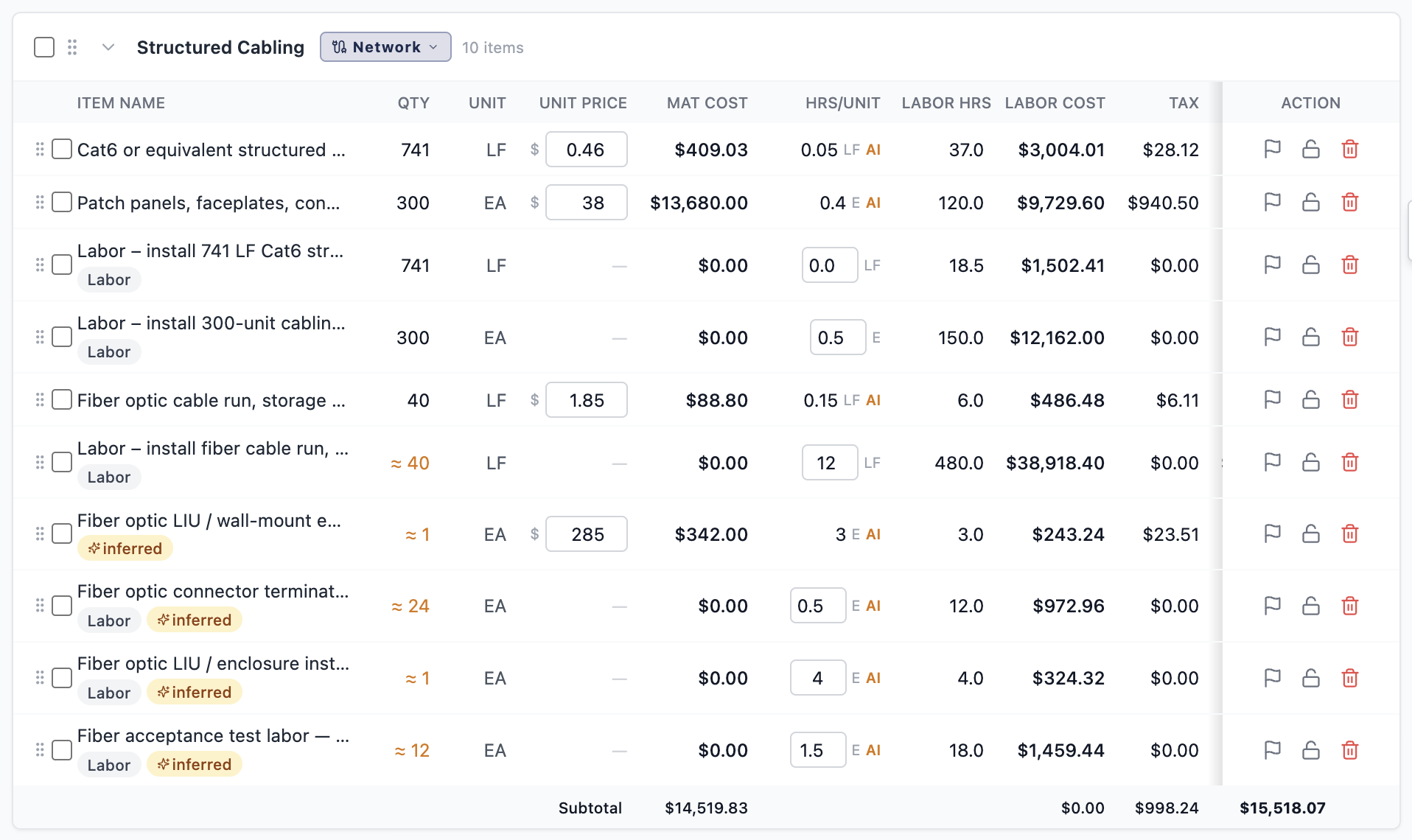
A trade-grouped section with unit prices, material cost, labor hours and tax on every line

The Whole Cost Picture, Out in the Open

Markup, overhead, profit, tax and per diem

Materials, labor cost, tax and every markup sit in one bar at the bottom of the estimate and update as you work. Nothing is buried in an admin screen where it can quietly price a job wrong.

  • Materials, labor hours and labor cost per line item
  • Overhead, profit, per diem and material markup, all editable
  • Prevailing-wage classification by bid type
  • Rate cards so the same job prices the same way twice
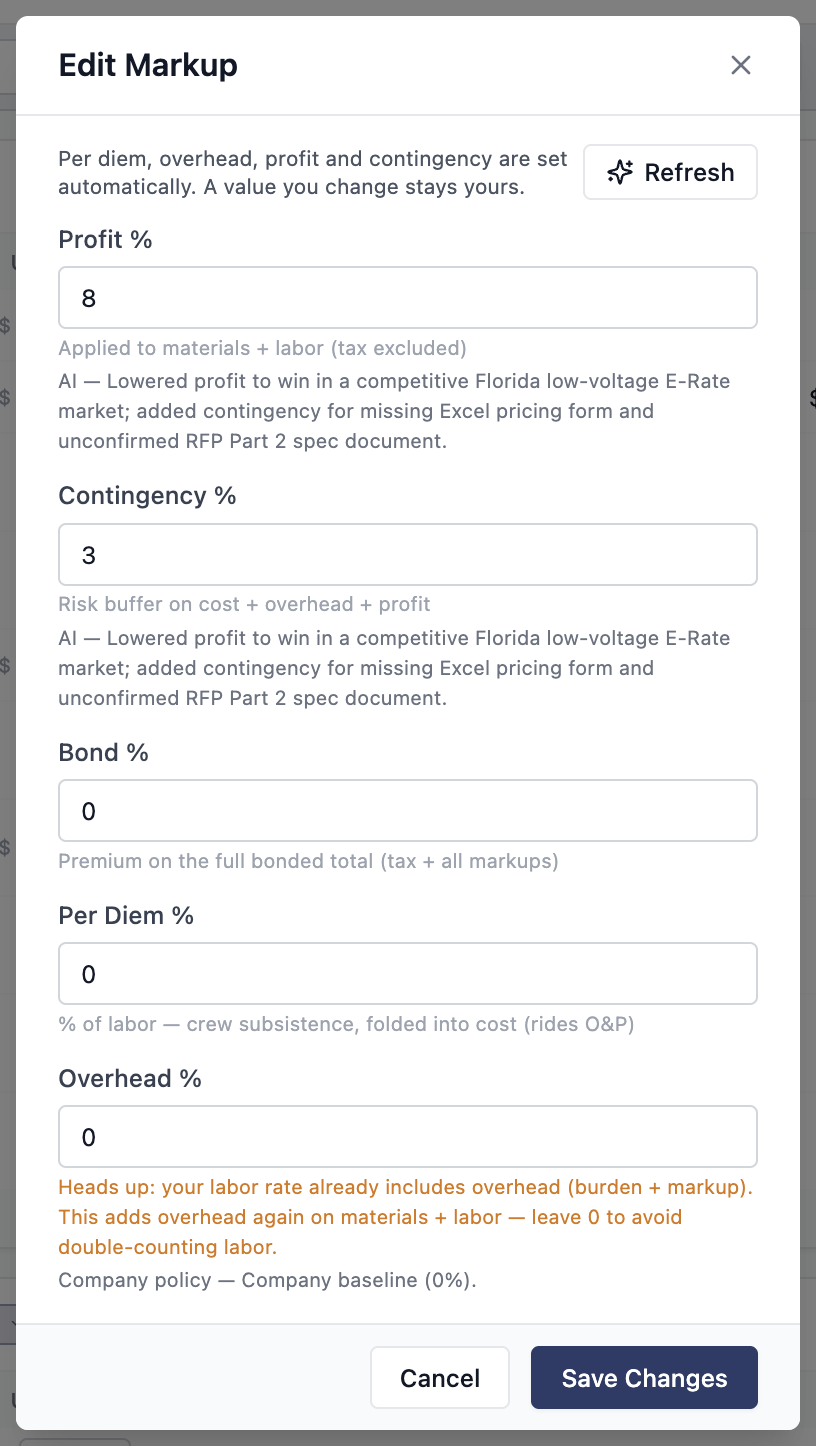
The markup dialog with overhead, profit, contingency, bond and per diem, and the reasoning behind each

An Agent That Actually Read the Documents

Ask about the bid, get the page it came from

Ask what the scope covers, when the proposal is due, or what a spec section requires. The answer comes back with a link to the document it came from, so you can check it rather than trust it.

  • Answers cite the source document
  • Summarize the bid or extract materials in one click
  • Choose the model per project
  • Learns your markups, labor rates and material costs bid after bid
The AI agent answering a question about the bid with citations to the source PDF and page
Ask the bid package

The AI has read the whole job. Ask it anything.

Specs, schedules, drawings and the RFP go in. Ask what the job requires, what you counted, or whether to bid at all — every answer comes back pointing at the page it came from, so you can check it before you price it.

Pick a question to ask it

AI Agent

What conduit does Section 26 05 33 call for? 3/4" EMT is the minimum above accessible ceilings, and rigid galvanised wherever it runs exposed below 8 ft or passes through a slab. Anything outdoors or in the parking structure has to be PVC-coated rigid. Connectors are steel compression throughout — the section rejects set-screw, which is what your last two jobs were priced with. Source: Spec 26 05 33 — p. 14

Others advertise on paper. Ours does the estimation.

Most estimating tools put the plan set on a screen and hand the rest back to you — the counting, the spec-hunting, the assemblies you have to build before you can price anything. Here is what changes when the software reads the package itself.

GATSY AI estimating compared with other estimating software, across six parts of the bid
Other estimating softwareWith GATSY AI10× faster
Digitises the plan set — the counting is still yoursVision counts and measures straight off the sheets
The specs are a PDF you still have to readAsk the agent; the answer comes back citing the page
Bid or no-bid stays a gut callScope checked against your own qualifications first
Assemblies and rate tables you build and maintainLearns your markups, labor rates and costs bid over bid
Estimating only — the won job moves to another toolTakeoff, contract, purchasing and job costing in one place
Per-seat licences, and an implementation project firstUnlimited users, running the same day

See what GATSY customers are saying

“GATSY has transformed how we handle our daily operations. The AI estimation alone has saved us countless hours every week.”
Jasmine AguilarOperations Manager · Teleteks

Ready to win more jobs with accurate estimates?

Start your 30-day free trial today. No credit card, no setup fee, and we’ll get GATSY configured around how your business already works.

GATSY AI estimating workspace showing a priced project takeoff
30-day Free TrialNo Credit Card RequiredCancel Anytime
View Manual