Orders & Procurement

From a scribbled materials list to a purchase order, without retyping anything

Buying is where estimates leak. A list gets typed into an email, a quote comes back in a PDF, somebody rekeys it into a PO, and the price nobody checked is the one you bought at. GATSY runs the whole cycle in one place — and will turn a shorthand list into a clean, trade-grouped BOM before you send it.

  • 30-day Free Trial
  • No Credit Card Required
  • Cancel Anytime
The procurement board with lanes for draft, requested, partial, received, awarded, accepted and placed orders
RFQ to purchase order
One boardRFQ to purchase order
Shorthand list in, clean BOM out
AI BOMShorthand list in, clean BOM out
Vendors, RFQs and PDFs grouped
By tradeVendors, RFQs and PDFs grouped
Free trial, no credit card
30 DaysFree trial, no credit card

What Orders & Procurement does

Type it the way you say it. Get a BOM you can send.

The AI BOM generator reads a contractor’s shorthand — or a vendor’s quote PDF — and hands back clean, quantified, trade-grouped line items.

It understands how you actually write a list

"25 - 1-1/2″ LB" comes back as twenty-five 1½-inch conduit bodies, not one LB with a quantity of 25. "500ft 3/4 EMT" becomes 500 FT of 3/4″ EMT conduit. The size-versus-quantity trap is the one that quietly ruins a materials order, and it is handled.

Or drop in the vendor’s quote

Up to five files a turn — PDF, Word, Excel, CSV, email or a photo of a handwritten list. Each file is read on its own, and a bad one comes back with a plain reason instead of failing the batch.

It will not invent a part number

Where an item is outside the parts catalog it leaves the PART # cell blank and says so, rather than guessing a code you would have ordered against. Type the code in the chat and it sets it.

Fix it by talking to it

Change a quantity, split a line, move something to another trade, drop a row — in plain language. It returns the edits rather than rewriting your list, so nothing you did not touch quietly changes.

One PDF per trade

Items are classified against the trades your vendors actually cover, and you get a separate BOM PDF for each — which is how they get sent out anyway.
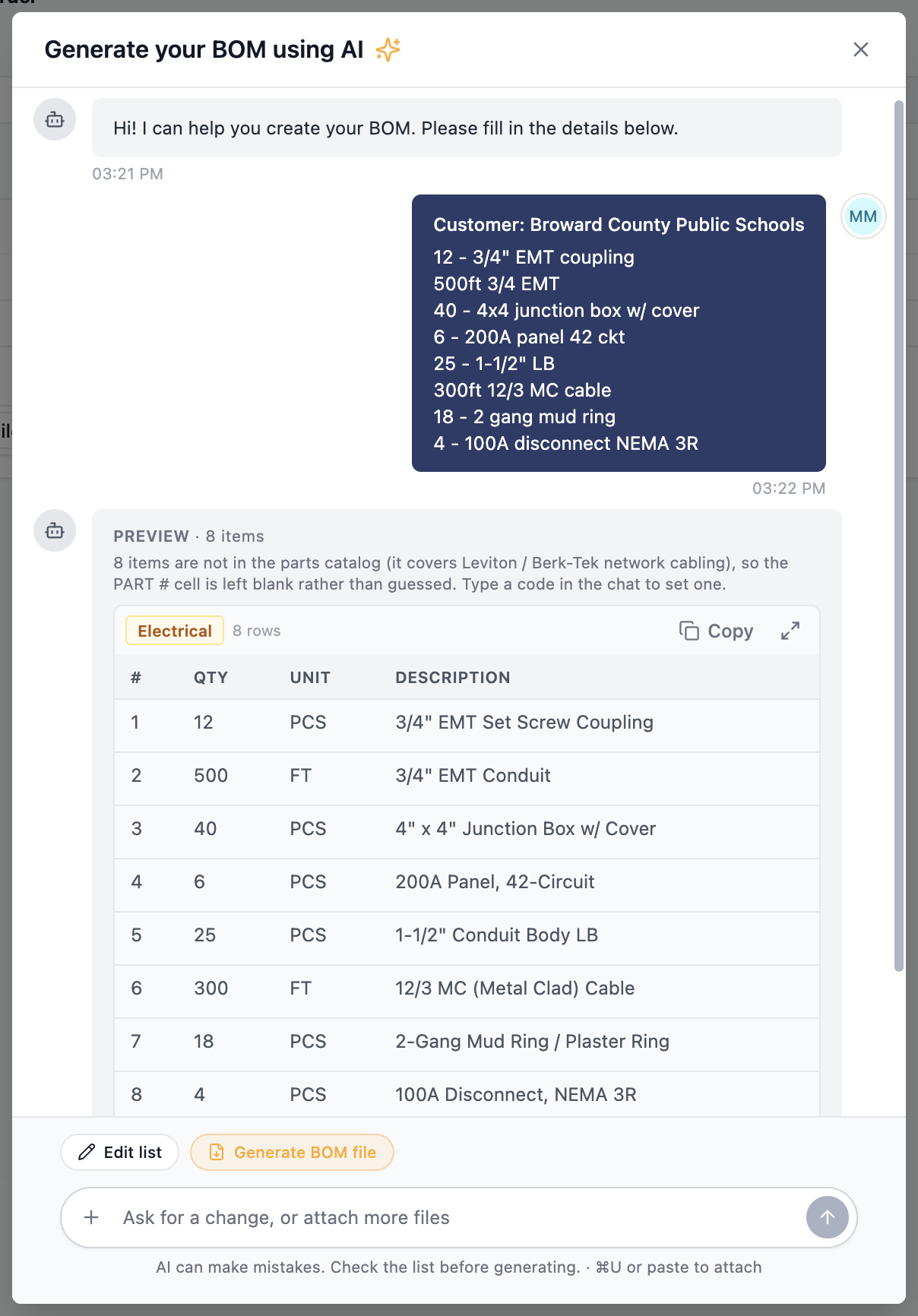
The AI BOM generator turning a shorthand materials list into a clean trade-grouped table

Every RFQ and order on one board

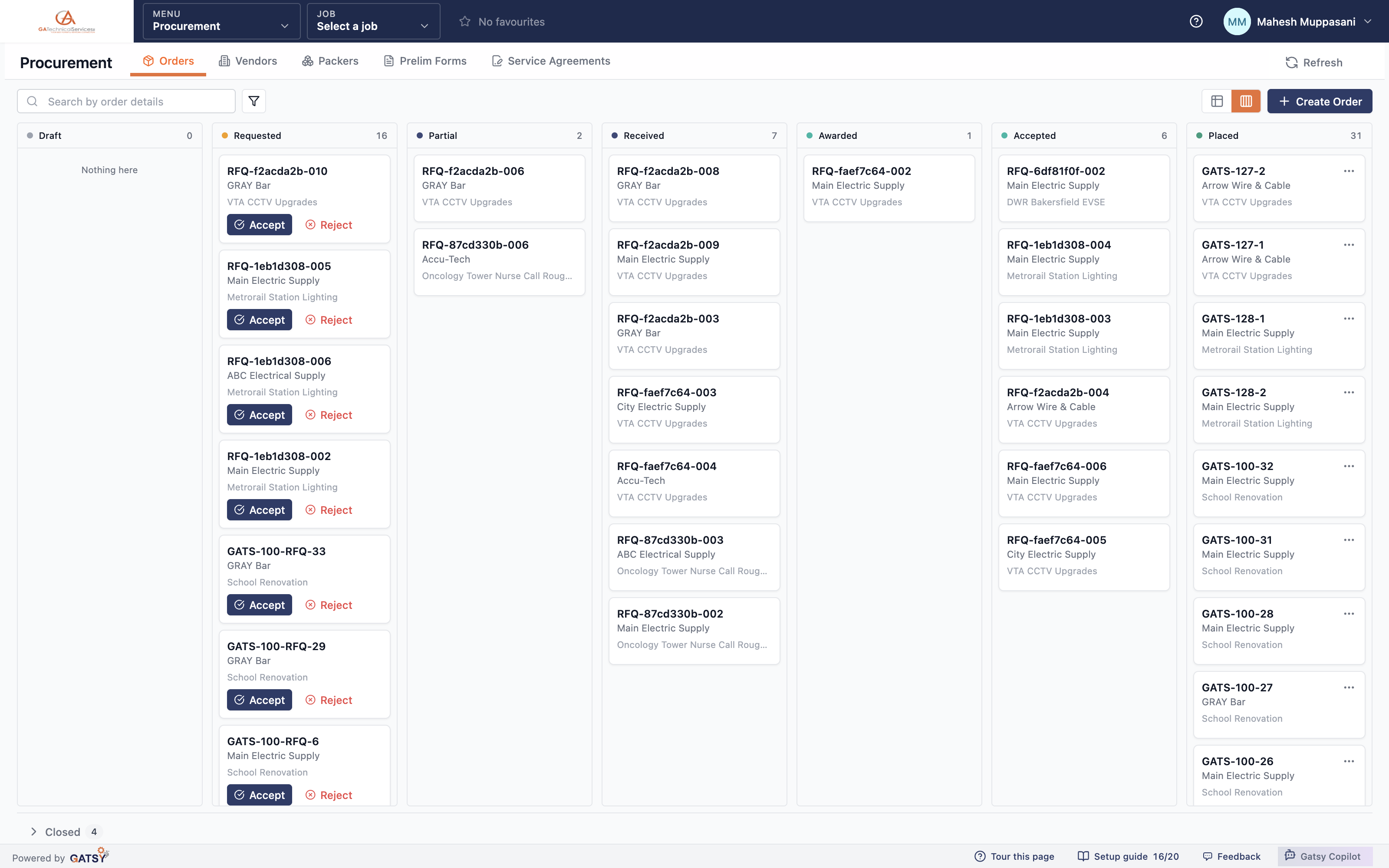
Draft, requested, partially quoted, received, awarded, accepted, placed — the whole buying cycle in lanes, with the closed work folded away.

The lanes are the lifecycle

An RFQ moves from requested to quoted to awarded to placed, and the board shows exactly where every one of them is sitting. Closed orders collapse into a strip so the board opens on live work.

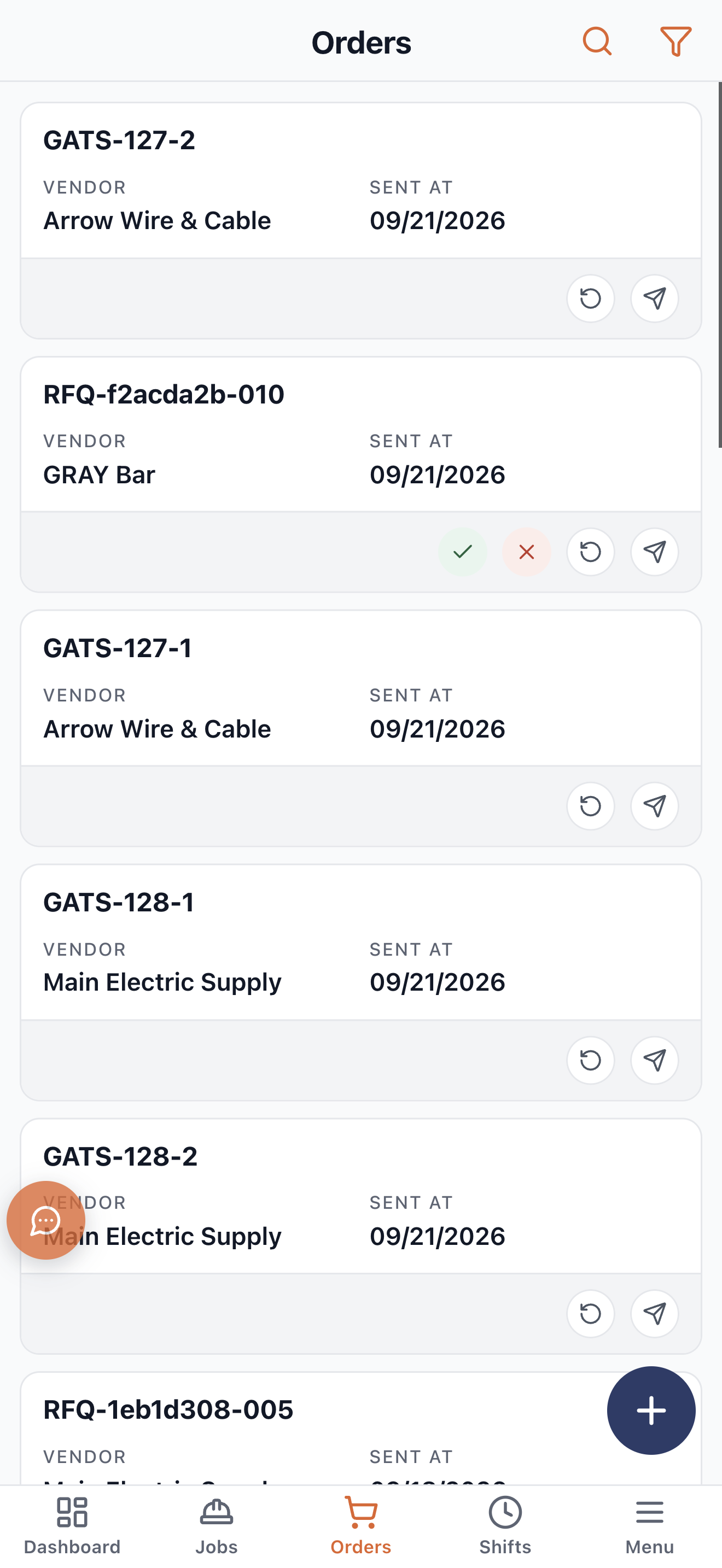
Accept or reject from the card

A quote that has come back can be accepted or rejected without opening anything. The ones waiting on you look like they are waiting on you.

Award per line, not all or nothing

A vendor can win some lines and not others. The three outcomes are recorded distinctly — won everything quoted, won some, won none — because "partial" means something different to your buyer than it does to your estimator.

Cancel, forward and record returns

Forward an order to a different vendor, cancel one, or record what came back. The order keeps its history instead of being edited into a different story.

The orders board showing draft, requested, partial, received, awarded, accepted and placed lanes

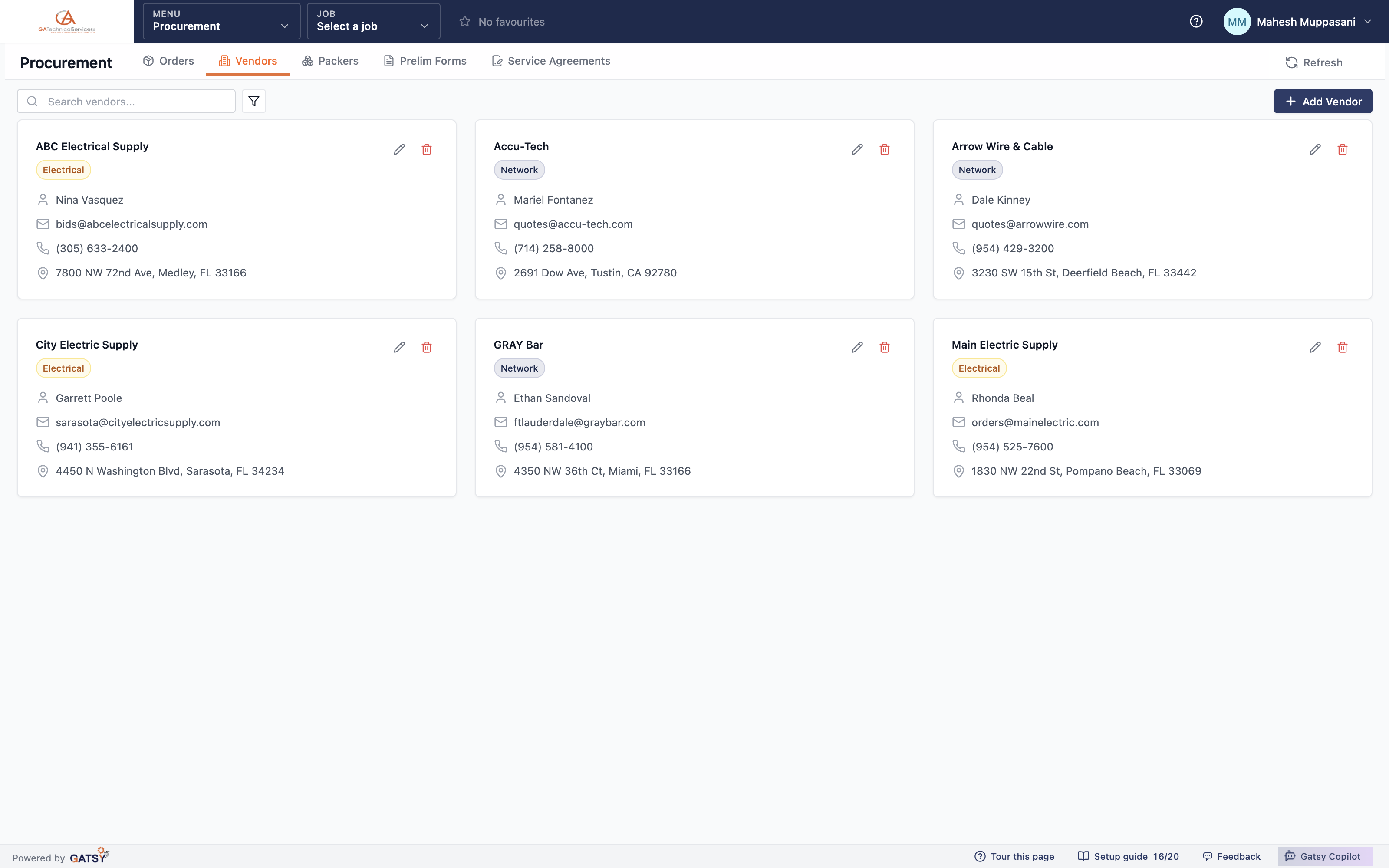
Vendors who actually cover the trade

The directory knows which trades each vendor supplies, which is what makes a trade-aware RFQ possible.

Trade coverage on the vendor

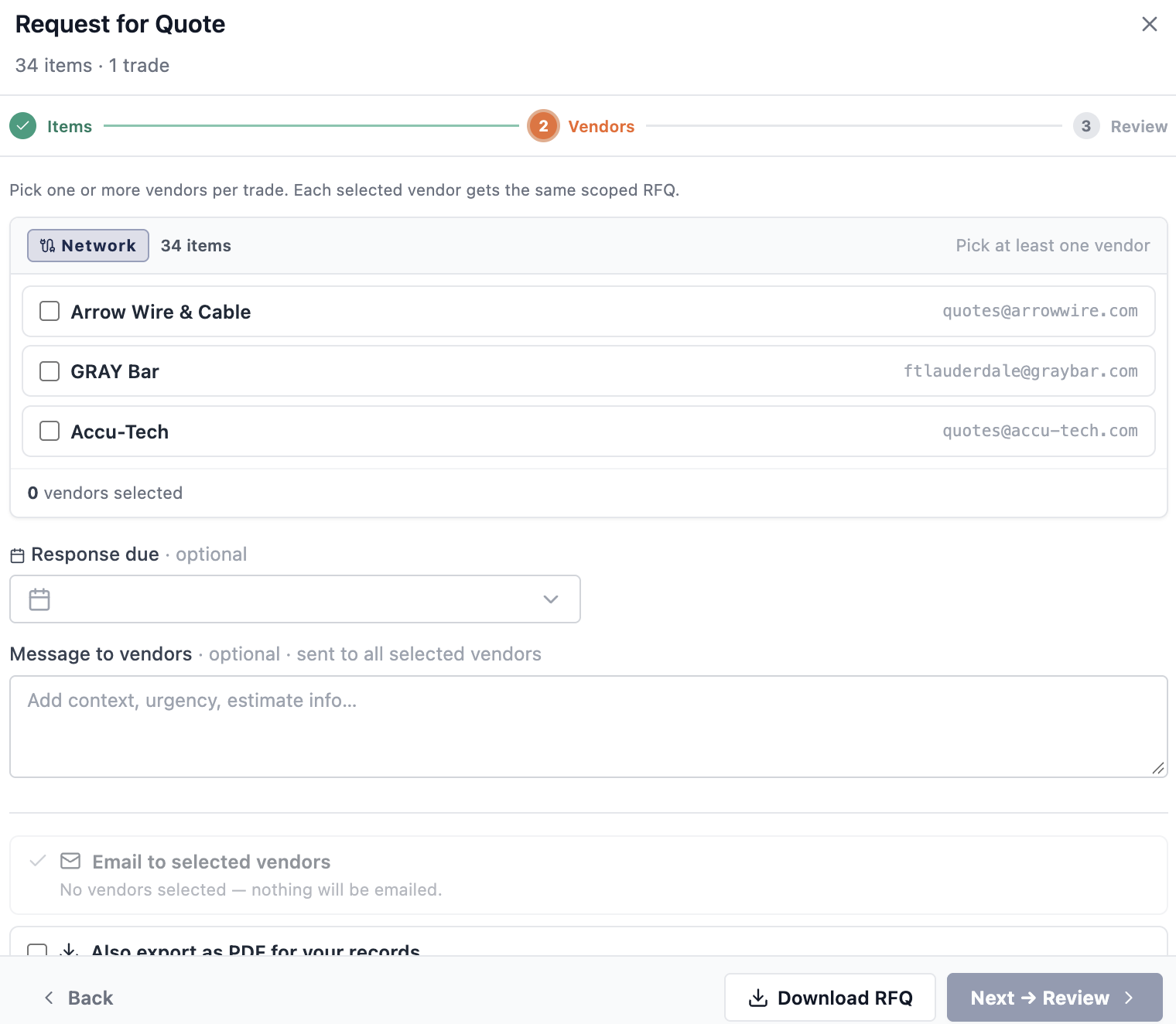
Each vendor records the trades they supply. When an estimate sends an RFQ, the vendor list is filtered to the ones who can actually quote that work — so a fire alarm package does not go to a wire house.

Send to many in one action

One batch send puts the same package in front of several vendors, each as its own RFQ, so the comparison that comes back is like for like.

Packers too

Packing lists and their attachments are kept against the job, so what was shipped can be checked against what was ordered.

The vendor directory showing suppliers and the trades they cover

The estimate buys the job

Send the RFQ from inside the estimate, to the vendors who cover that trade — then award it and let the purchase orders write themselves.

No retyping between estimating and buying

Send RFQs from inside the estimate, compare what comes back, award it — and turn the awarded lines into purchase orders, one per vendor, without anyone re-entering a line item.

The price you bought at is the price you estimated against

Because the award writes back, the estimate and the order agree. That is the gap most contractors lose margin through, and it closes by not existing.

Prelim forms where the job needs them

Preliminary notices built from reusable templates, carrying the job, vendor, subcontractor, bonding company and owner — the paperwork public work demands.

The RFQ dialog showing 34 items in one trade with only the vendors who cover that trade listed

How buying runs in GATSY

  1. 1

    Build the list

    Type it in shorthand, drop in a vendor quote, or pull it straight from the estimate’s takeoff.

  2. 2

    Send the RFQs

    To the vendors who cover that trade, as one batch, by email or as a PDF.

  3. 3

    Compare and award

    Quotes come back side by side. Award per line, to whichever vendor won it.

  4. 4

    Place the order

    Awarded lines become purchase orders, one per vendor, tracked through to delivery.

Questions contractors ask

Do I have to use the AI to build a materials list?

No. You can add order groups and line items by hand, or import them from the estimate. The BOM generator is there for the times you have a scribbled list or a vendor PDF and do not want to retype it.

What file types can I give the BOM generator?

PDF, Word, Excel, CSV, plain text, HTML, email files, and photos — including a picture of a handwritten list. Up to five files a turn, 10 MB each. Every file is read on its own, so one bad file does not fail the batch.

Will it make up part numbers?

No, and that is deliberate. Where an item is not in the parts catalog it leaves the part number blank and tells you why, rather than guessing a code you would then order against.

Can one vendor win part of a quote?

Yes. Awards are per line item. The system records whether a vendor won everything they quoted, some of it, or none — three different outcomes, not one status.

Does a purchase order connect back to the job?

Yes. Orders carry their job, so the material cost lands on that job’s cost to date and shows up on the Job Hub without anybody reconciling it.

Ready to run every job in one place?

Start your 30-day free trial today. No credit card, no setup fee, and we’ll get GATSY configured around how your business already works.

GATSY AI estimating workspace showing a priced project takeoff
30-day Free TrialNo Credit Card RequiredCancel Anytime
View Manual