Gatsy Copilot

Ask your business a question and get the table, not a dashboard to interpret

The number you want is rarely the number on the dashboard. Gatsy Copilot sits over the whole system and answers in plain language — which jobs are ready to invoice, what a customer still owes, who was on site last Tuesday — reading your own data, and only the part of it the person asking is allowed to see.

  • 30-day Free Trial
  • No Credit Card Required
  • Cancel Anytime
Gatsy Copilot answering which jobs are ready to invoice with a table and a total
Ask the way you would ask a person
Plain languageAsk the way you would ask a person
Jobs, money, crews, orders
Your dataJobs, money, crews, orders
Only what the asker may see
Permission-boundOnly what the asker may see
It answers; it does not change things
Read-onlyIt answers; it does not change things

What Gatsy Copilot does

A question in, a table out

Not a chart to read and not a report to configure — the actual rows, with the total.

It answers the question you asked

Ask which jobs are ready to invoice and how much that is worth, and it returns the jobs — with original price, change orders, invoiced to date and balance to invoice — then totals it. Not a link to a report that might contain it.

The answer is a table you can take away

Results come back as real rows with a copy action, so the number goes straight into the email or the meeting you were heading into.

It offers the next question

After an answer it suggests where you might want to go — recent activity on one of those jobs, its expenses, its shifts — because the first question is rarely the last one.

It reaches across the whole system

Customers, jobs, contracts, orders, shifts and expenses are all in scope. The questions that used to need three screens and a spreadsheet are one sentence.
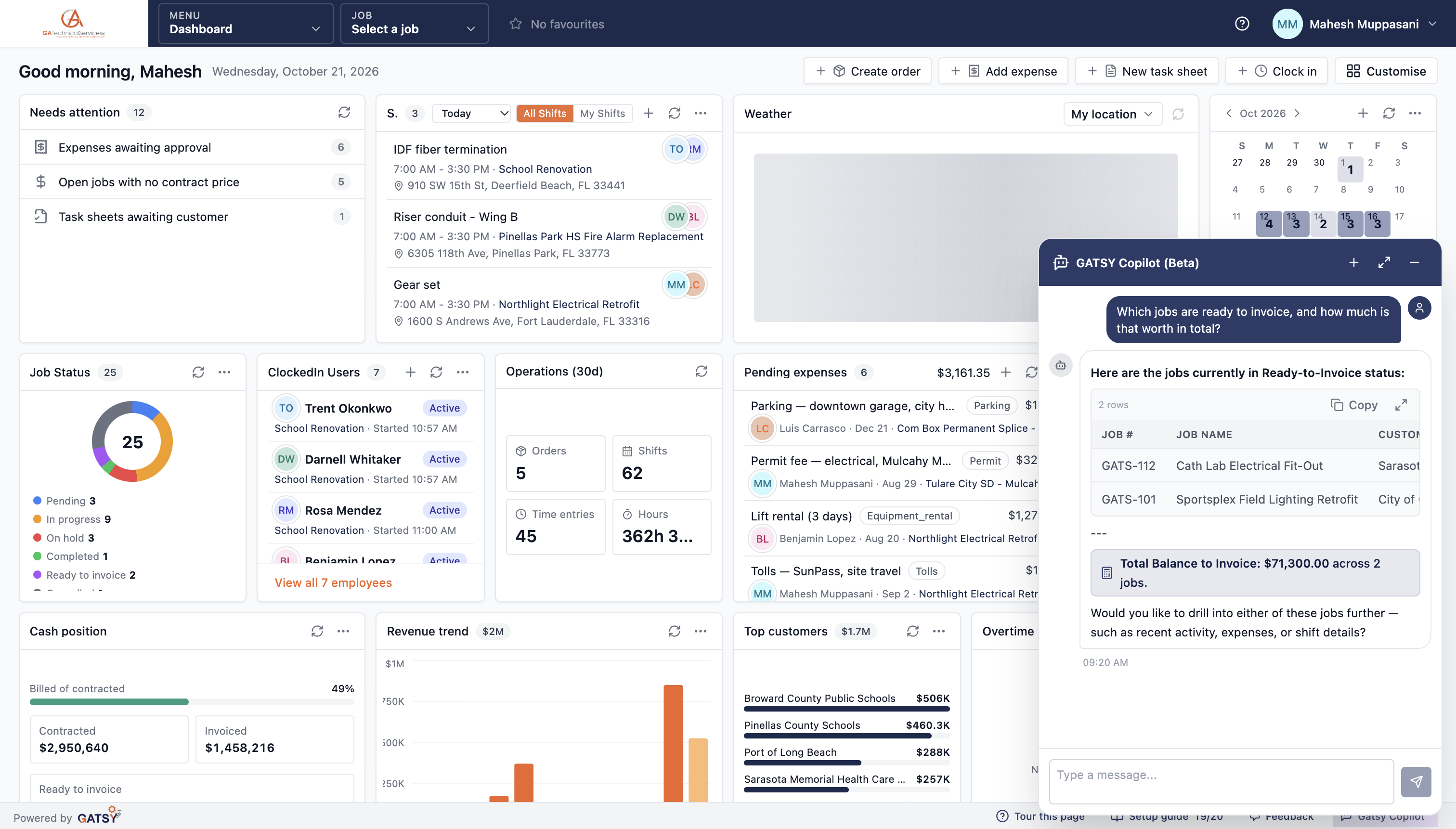
A Copilot answer listing two jobs ready to invoice with a balance total of $71,300

It cannot tell someone what they are not allowed to know

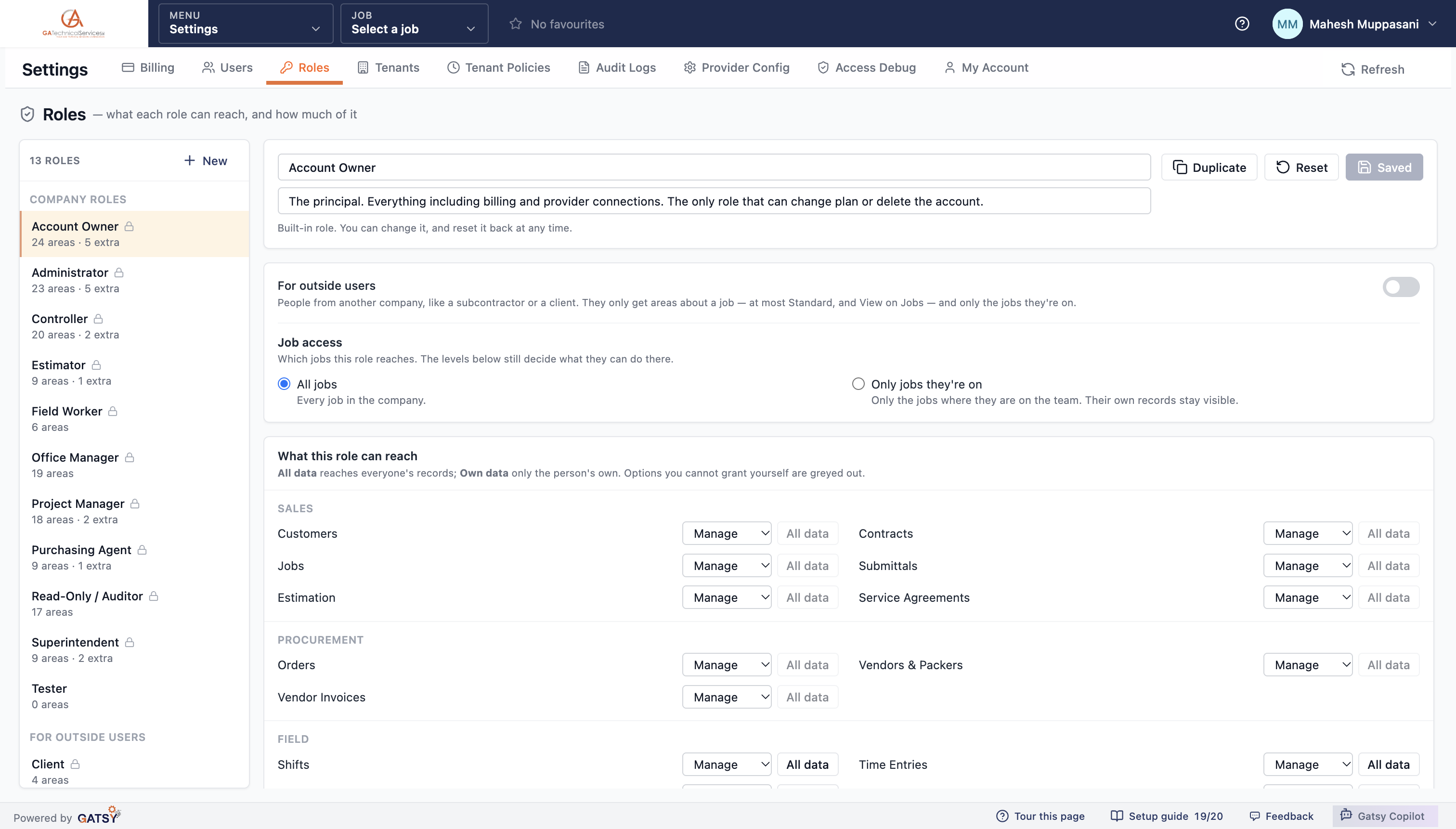
Copilot is a permission in its own right, and its answers are bounded by the role of whoever is asking.

Answered only from what that role can see

The permission catalog describes it in exactly those terms. A foreman asking about margin gets nothing a foreman could not already open — the assistant is not a way around the access model.

Seeing job cost is still its own permission

Cost, burden and wage rates sit behind a separate right. Copilot respects it, so putting the assistant in front of the crew does not quietly publish your margins.

Outside users never hold it

Subcontractors and clients cannot be granted Copilot at all. It is a tool for your company, inside your company.

It reads; it does not act

Today the assistant answers questions. It does not create, edit or delete records, so asking it something can never change something.

The roles screen showing company roles separated from roles for outside users

Always there, never in the way

It travels with you across the app rather than living on a page you have to go to.

Open it from wherever you are

The assistant sits in the app chrome on every screen. Ask from the dashboard, from a job, from the middle of an estimate — without losing where you were.

It suggests what to ask

Opening it cold offers a starting point — how many active jobs, show all customers, pending expenses — so the blank box is never the obstacle.

Expand it when the answer is big

A wide table gets the room it needs rather than being squeezed into a corner panel.

Copilot open over the dashboard without navigating away

How Copilot answers

  1. 1

    Ask in plain language

    From any screen, the way you would ask the person who keeps the spreadsheet.

  2. 2

    It reads your records

    Customers, jobs, contracts, orders, shifts and expenses — live, not a nightly export.

  3. 3

    Your permissions apply

    The answer is assembled only from what your role can already open.

  4. 4

    You get rows and a total

    Copy it, or ask the follow-up it offers.

Questions contractors ask

Can it see data I am not allowed to see?

No. Copilot answers only from what your role can already open, and seeing job cost remains a separate permission it respects. It is not a way around the access model.

Can it change my records?

No. It is read-only today — it answers questions and does not create, edit or delete anything. Asking it something cannot change something.

What sort of questions does it handle?

Operational ones about your own business: which jobs are ready to invoice, what a customer still owes, how many hours went to a job, which expenses are waiting on approval, what is in the estimating pipeline.

Can I give it to my subcontractors?

No, deliberately. Outside users — subcontractors and clients — cannot hold Copilot at all. It is for people inside your company.

Ready to run every job in one place?

Start your 30-day free trial today. No credit card, no setup fee, and we’ll get GATSY configured around how your business already works.

GATSY AI estimating workspace showing a priced project takeoff
30-day Free TrialNo Credit Card RequiredCancel Anytime
View Manual