Fleet Tracker

Know what the trucks cost you, and what is about to need a shop

Fuel is one of the few job costs a contractor pays every week and almost never reconciles. GATSY takes the odometer and the receipt and works out the rest — miles between fills, miles per gallon, price per gallon, and which fill is out of line. The same place keeps each vehicle on a service interval, so a brake inspection comes due before a truck comes off the road.

  • 30-day Free Trial
  • No Credit Card Required
  • Cancel Anytime
The Fleet Tracker overview: total fuel cost, miles driven, average MPG and services due, with a cost trend per vehicle
Miles and MPG worked out from the odometer
Per fillMiles and MPG worked out from the odometer
A bad tank is marked the moment it is logged
FlaggedA bad tank is marked the moment it is logged
Service due on whichever comes first
Miles or monthsService due on whichever comes first
A fill becomes a job expense with its receipt
One switchA fill becomes a job expense with its receipt

What Fleet Tracker does

Every fill-up, costed the moment it is logged

Somebody types the odometer, the gallons and what it cost. The rest is worked out.

Miles, $/gallon and MPG come from the gap

Each fill is compared with the previous one on that vehicle, so miles since last fill, price per gallon and miles per gallon are all derived. Nobody does arithmetic at the pump, and nobody maintains a spreadsheet afterwards.

A bad tank gets flagged

A fill under 10 MPG reads LOW MPG and one over $4.50 a gallon reads HIGH $/GAL, in red, in the log. That is usually how you find out about a dragging brake, a tyre down to the cord, or fuel going into something that is not the truck.

Nothing is stored that could go stale

Every derived figure is computed on read, never saved. Somebody who enters last Tuesday's fill a week late does not leave a wrong MPG behind them — the neighbouring fills simply re-derive.

It will not take an impossible reading

An odometer below where tracking started is refused, and a flat or lower reading leaves miles and MPG blank rather than inventing a number. Bad data stays out instead of being averaged in.

The whole log exports

CSV for the accountant, PDF for the folder. Every column that is on screen, including the flags.
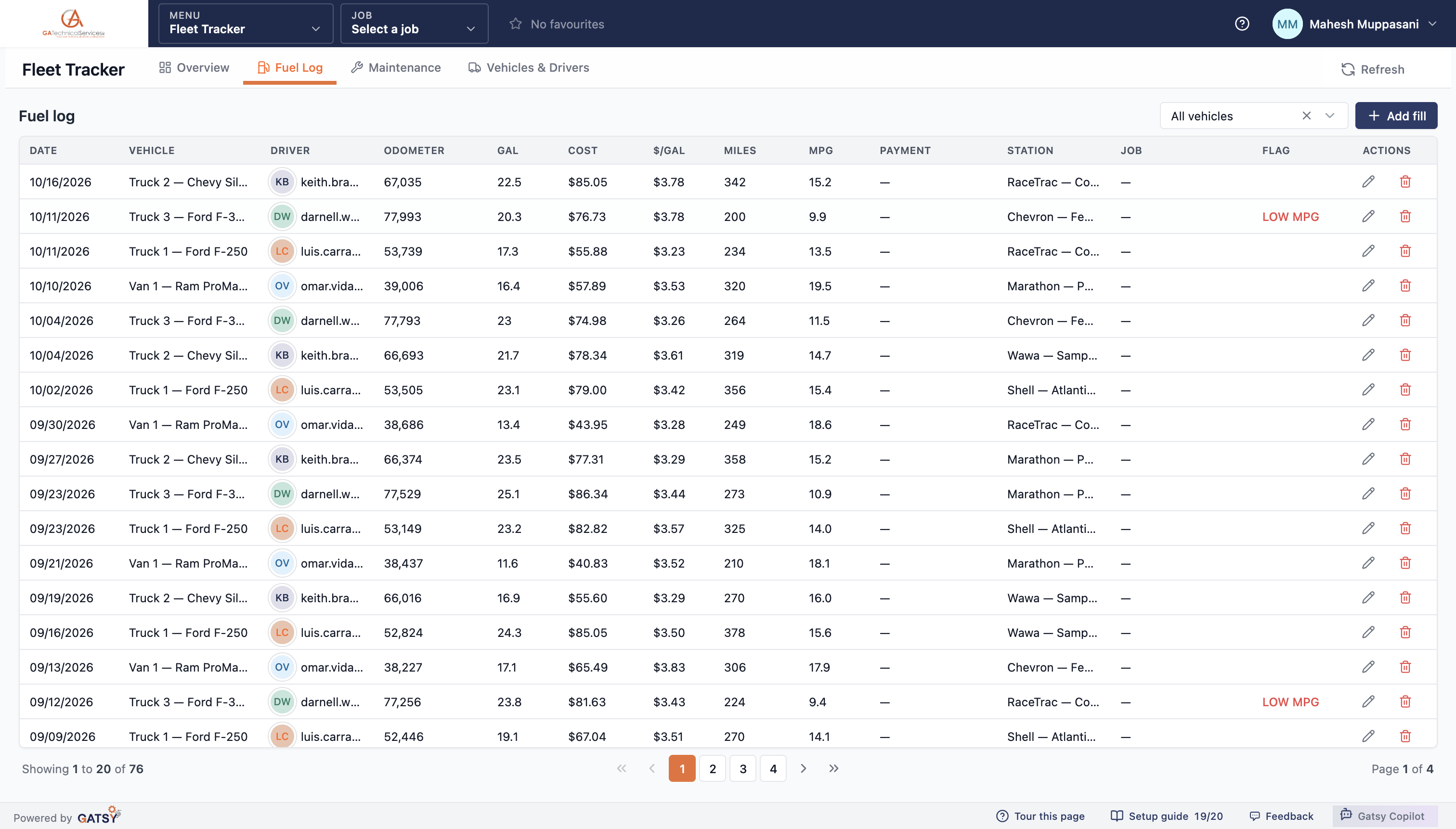
The fuel log with date, vehicle, driver, odometer, gallons, cost, dollars per gallon, miles, MPG, station and a red LOW MPG flag

Fuel that lands on the job, with the receipt attached

The point of tracking fuel is job cost. One switch on the fill puts it there.

Pick a job, flip the switch

A fill with a job on it can be logged as an expense. GATSY writes a matching Fuel expense — the vehicle and the date in the description, the station as who it was paid to, the card it went on — and keeps the two in step if the fill is edited afterwards.

The receipt goes to the job folder

Photograph the receipt onto the fill and it is stored on the expense, in that job's Expenses folder, the same place every other receipt for that job lives.

An approved expense is never destroyed

Turn the switch back off and the mirrored expense is removed — unless it has already been approved, in which case it is unlinked and left alone. Approved financials do not disappear because somebody changed their mind about a checkbox.

The card is already filled in

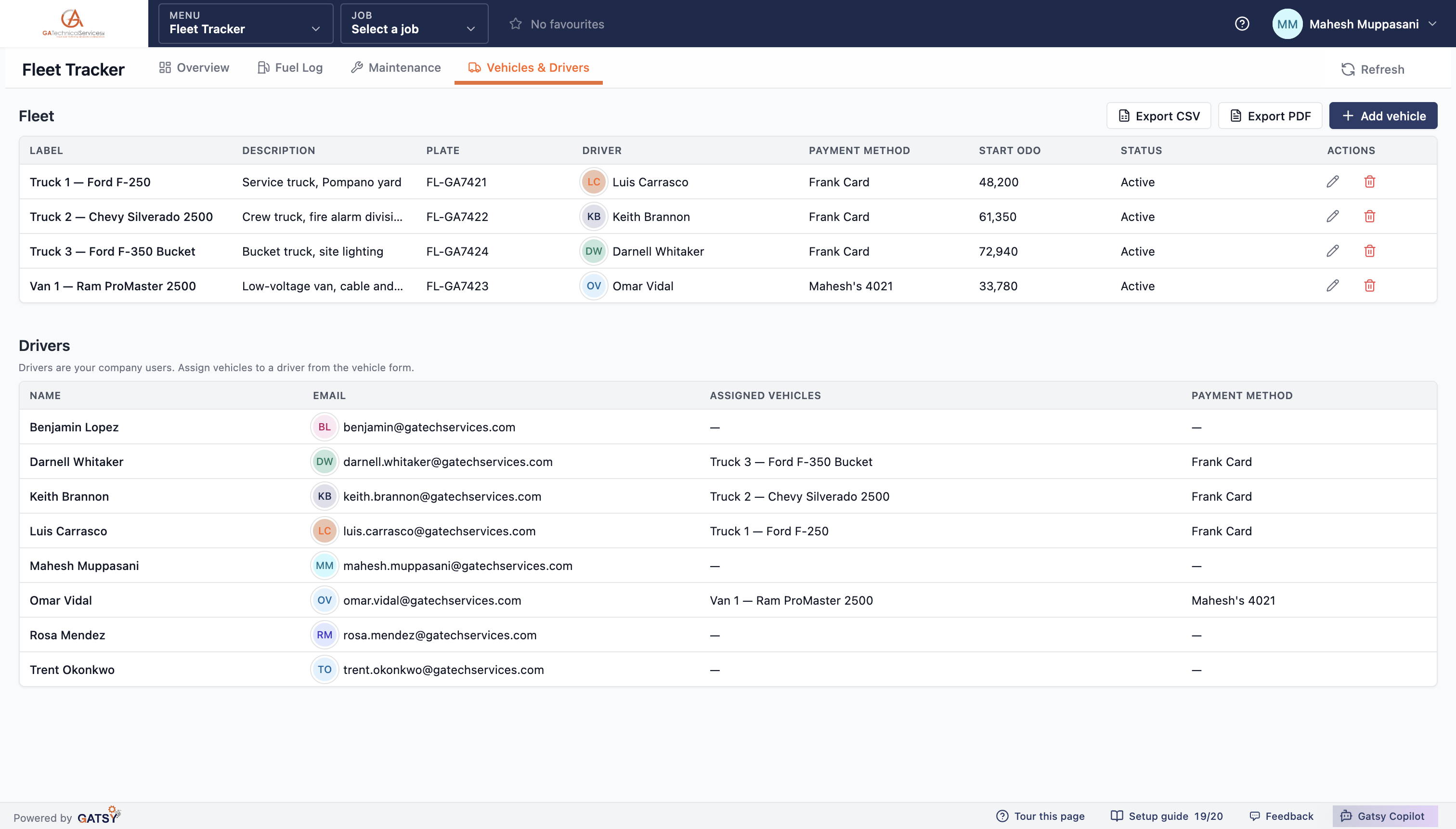
Each vehicle carries its assigned driver and its fuel card, so picking the truck fills both in. The driver changes it only when it was somebody else at the pump.

The fleet list with each vehicle's plate, assigned driver, fuel card and starting odometer, above the driver roster

Service due on miles or months — whichever comes first

The way a shop actually schedules work, rather than a reminder on somebody's phone.

Both limits, together

A service carries a mileage interval, a time interval, or both. Oil every 5,000 miles or 6 months; a DOT annual inspection on time alone. Whichever limit is reached first is the one that decides the status.

Due soon before overdue

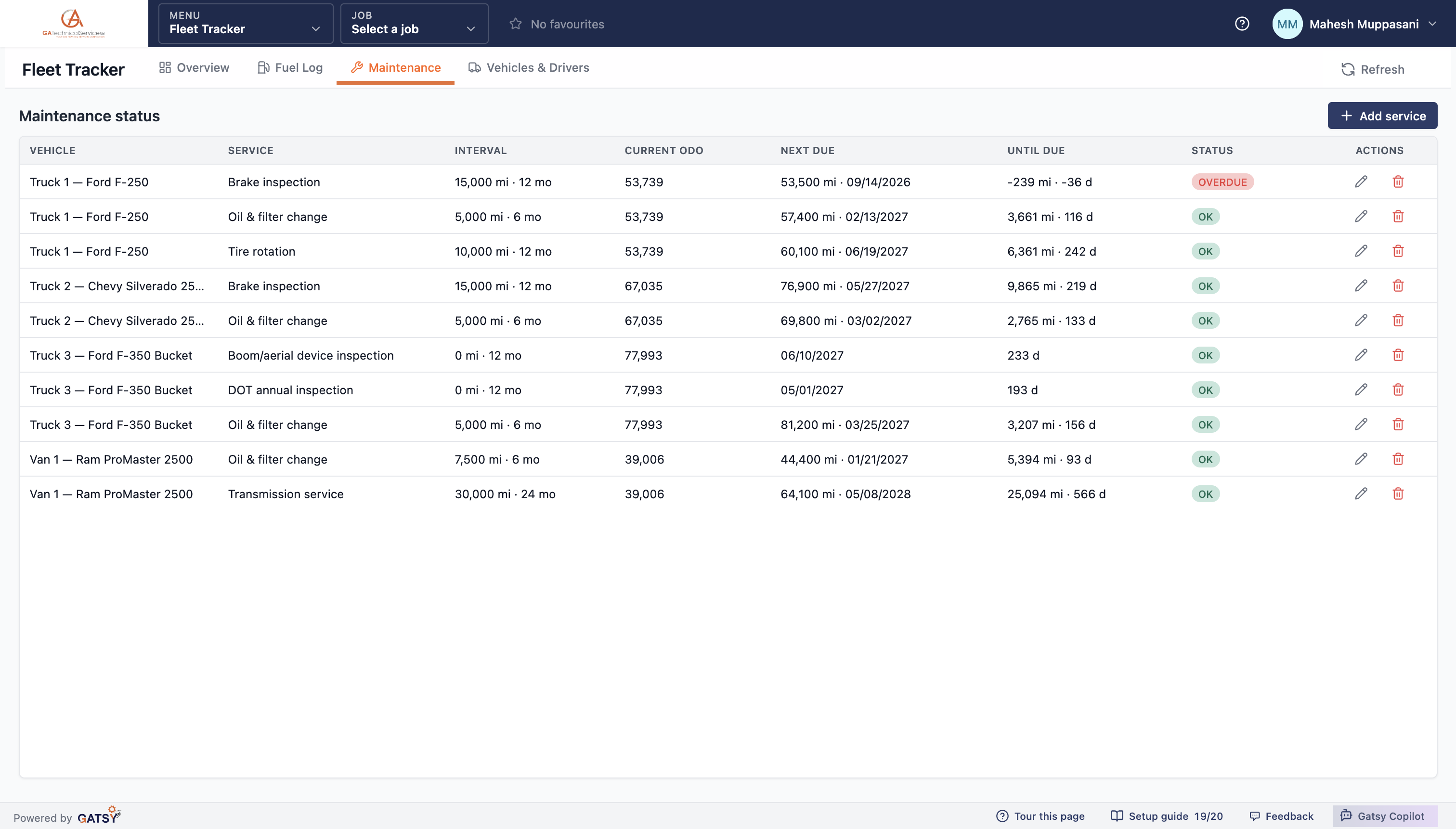
A vehicle reads DUE SOON once it is within 500 miles or 30 days of a service, and OVERDUE after. The overview carries a single count of everything overdue or due soon, so the number you glance at is the number that matters.

Counted off the real odometer

Current mileage comes from the fuel log, not from someone remembering to update a field. Log fuel and the maintenance board moves by itself.

It says how far, not just whether

Next due shows the odometer reading and the date; until due shows the miles and days remaining, negative once it is past. That is enough to decide whether a truck finishes the week.

The maintenance board: interval, current odometer, next due, time until due, and an overdue brake inspection

What the fleet is costing, at a glance

Four figures and two charts, filtered to one truck when you want to argue about one truck.

The four that matter

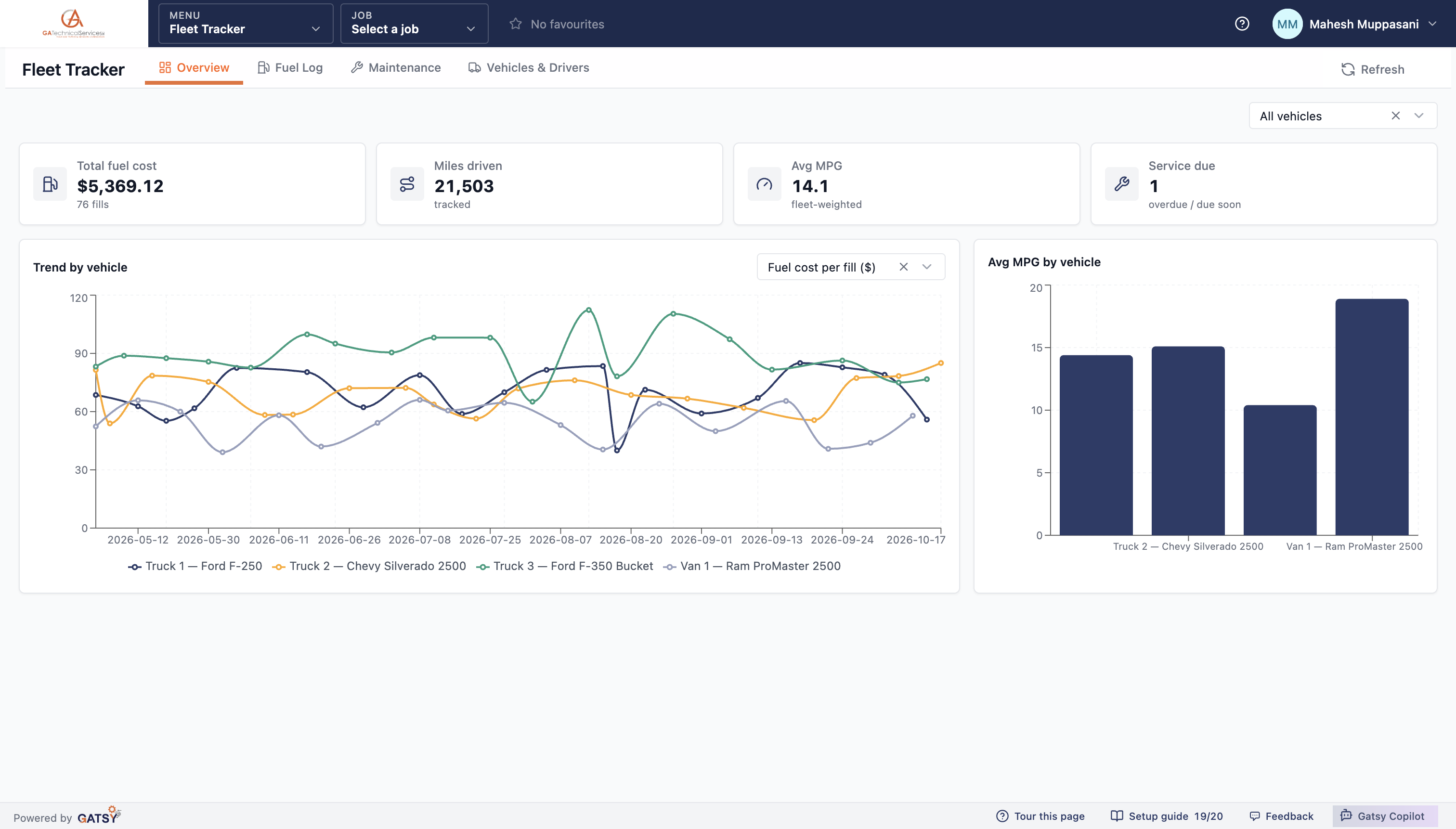
Total fuel cost and the number of fills behind it, miles driven, fleet-weighted average MPG, and how many services are overdue or due soon.

Four ways to read the trend

The trend chart plots cost per fill, price per gallon, MPG or cumulative miles — one line per vehicle, so an outlier shows up as a line that diverges rather than a number in a table.

MPG side by side

A bar per vehicle makes the comparison the one everybody actually wants: which truck is drinking.

Narrow to one vehicle

The filter at the top applies to the figures and both charts at once, which is how you answer "is it the truck or the driver".

Fuel cost, miles, average MPG and services due above a per-vehicle cost trend and an average MPG bar chart

How the fleet gets tracked

  1. 1

    Add the trucks

    Label, plate, starting odometer, the driver it belongs to and the fuel card it runs on.

  2. 2

    Set the service intervals

    Oil, tyres, brakes, DOT — by miles, by months, or by both.

  3. 3

    Log the fills

    Odometer, gallons, cost. Pick a job and the fill becomes an expense with its receipt.

  4. 4

    Read the flags

    A tank out of line is marked, a service coming due is counted, and the whole log exports.

Questions contractors ask

Do drivers need their own access to log fuel?

They can have it. A driver limited to their own data may log fuel only against a vehicle assigned to them — picking somebody else's truck is refused by the server, not just hidden on screen. Managing the vehicle list and the service intervals is a separate, wider permission.

What happens if a fill is entered out of order?

Nothing breaks. Miles and MPG are derived from each vehicle's full history every time the log is read, so a fill entered a week late re-derives the fills around it instead of leaving a wrong figure behind.

Can fuel go straight onto job cost?

Yes. A fill with a job on it can be logged as an expense in one switch: GATSY writes a matching Fuel expense with the station, the card and the date, and stores the receipt in that job's Expenses folder.

What counts as a flagged fill?

Under 10 miles per gallon, or over $4.50 a gallon. Both show in red in the fuel log so a bad tank is visible without anyone reading the whole page.

What happens to the history if we sell a truck?

Deleting a vehicle takes it and its fills out of the logs, dashboards and exports, but the records are kept. The vehicle sits in Recently deleted for 30 days and restoring it brings everything back with it.

Can I get the fuel log out of GATSY?

Yes — CSV or PDF, with every column including the derived miles, MPG, price per gallon and the flags.

Ready to run every job in one place?

Start your 30-day free trial today. No credit card, no setup fee, and we’ll get GATSY configured around how your business already works.

GATSY AI estimating workspace showing a priced project takeoff
30-day Free TrialNo Credit Card RequiredCancel Anytime
View Manual