Submittals & Cut Sheets

The package the GC actually wants, built from the bid documents you already have

Submittals are the job nobody wants: read the spec, find every product, hunt the data sheets, assemble a package per section, write a transmittal, and send it before the deadline. GATSY reads the bid documents, builds the packages, tells you what it is unsure about, and sends them — while you stay the one who approves what goes out.

  • 30-day Free Trial
  • No Credit Card Required
  • Cancel Anytime
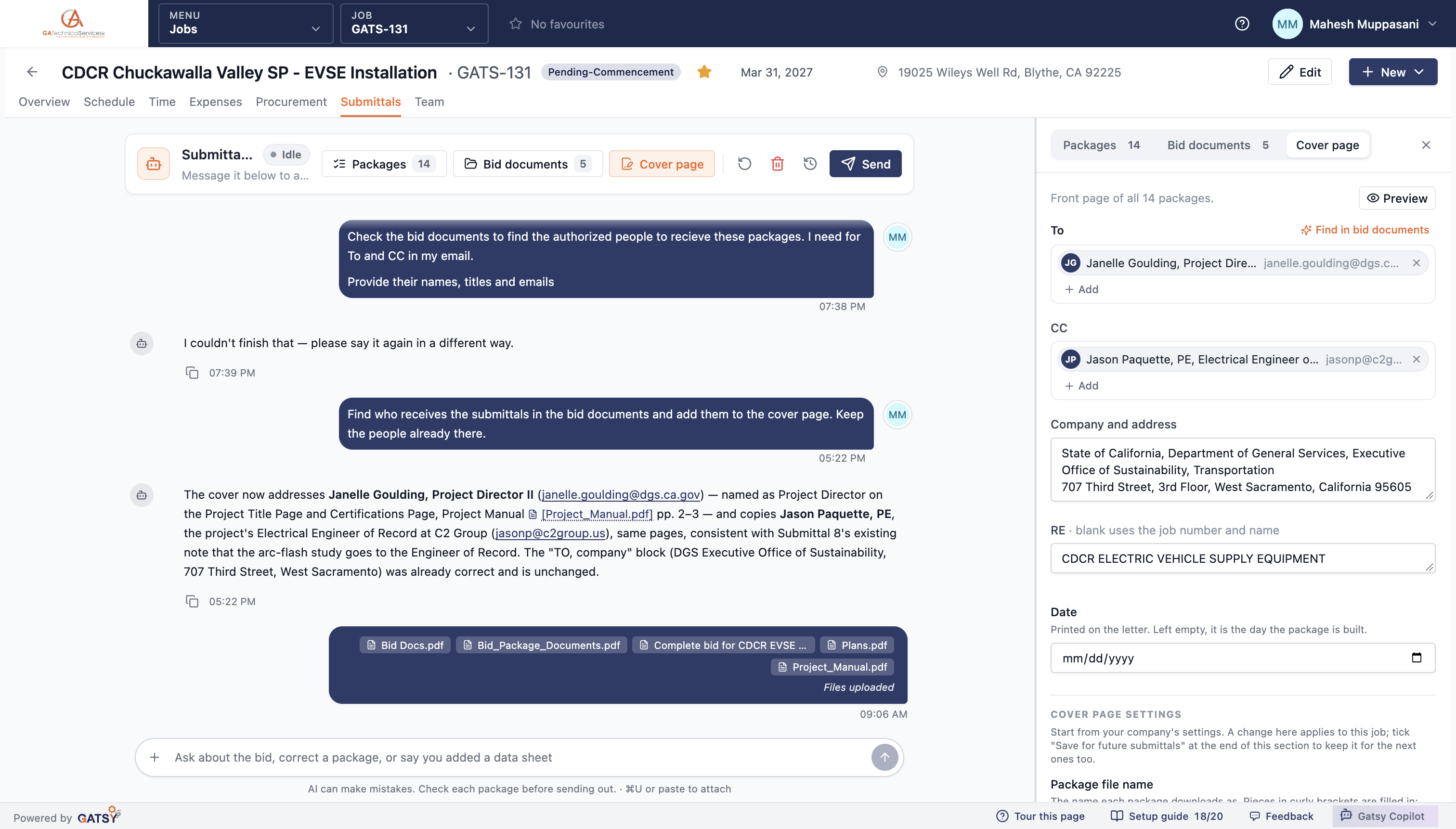
The submittals agent answering a question about who receives the packages, citing the project manual by page
Reads what you already uploaded
From the bidReads what you already uploaded
One package, one file to send
Per sectionOne package, one file to send
Every answer points at the page
CitedEvery answer points at the page
Nothing sends by itself
You approveNothing sends by itself

What Submittals & Cut Sheets does

It reads the bid documents, then builds the packages

Specs, drawings and the project manual go in. Submittal packages come out, grouped the way the spec asks for them.

One package per spec section

Product Data & Shop Drawings — Panelboards. Product Data — Grounding and Bonding. Raceways and Underground Ducts. Each one is a single file: a cover letter, then a data sheet for every item listed.

The register is a real register

Every item carries its manufacturer, model, description, the sheet it came from and the spec reference — "Siemens P1 distribution panelboard ‘EV-1’, 250A bus, QJ main breaker set at 150A trip, 208Y/120V 3-phase 4-wire, 30 circuits, NEMA 3R."

Complies, or-equal, or deviates

Each item is marked against what the bid asked for. A product the spec names is marked as such; an equal where the bid allows equals is marked as an equal; anything that deviates is flagged with the note explaining why, because that is what the reviewer is looking for.

It knows what does not need a data sheet

A letter, a plan or a certificate has no cut sheet to attach, and the agent does not go hunting for one or hold the package waiting.
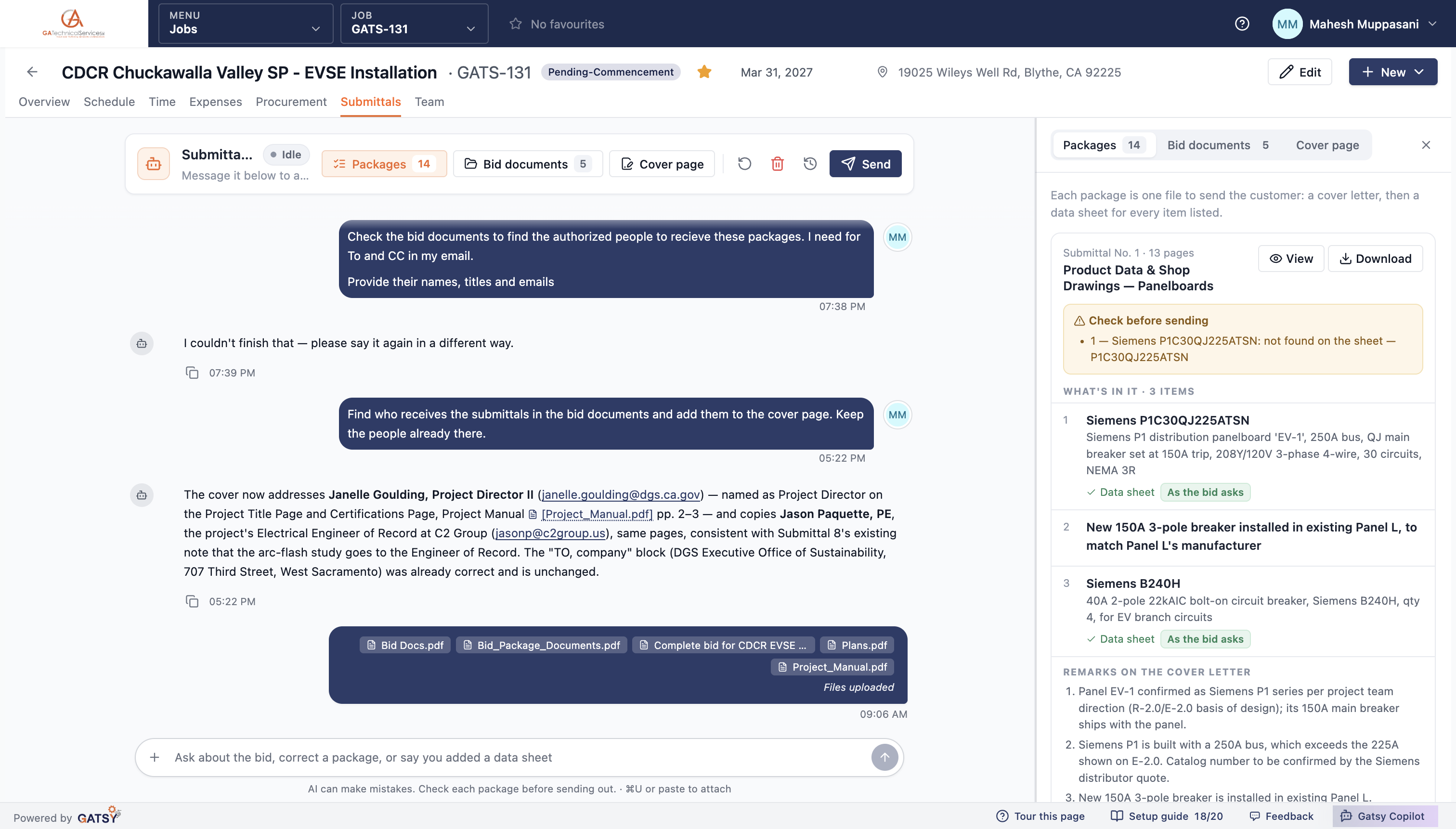
A submittal package showing its items, their descriptions, data-sheet status and the cover letter remarks

It tells you what it is unsure about, in writing

Every package carries the things a person should check before it goes out — and the agent explains its reasoning rather than hiding it.

"Check before sending"

Each package lists what is worth a look: a part number it could not find printed on the sheet, an item with no data sheet attached, a description that does not match its source. Nothing is quietly waved through.

It catches the things an estimator would catch

On a real package it noted: "Siemens P1 is built with a 250A bus, which exceeds the 225A shown on E-2.0. Catalog number to be confirmed by the Siemens distributor quote." That is the kind of discrepancy that comes back as a rejected submittal three weeks later.

The remarks are engineering notes, not filler

Cover letter remarks record what was confirmed and on whose direction — "Panel EV-1 confirmed as Siemens P1 series per project team direction (R-2.0/E-2.0 basis of design); its 150A main breaker ships with the panel."

And it asks when it genuinely cannot decide

Rather than guessing, it raises a question with what it found, what is unclear and what it suggests — and waits. You answer in the chat and it carries on.

The check-before-sending panel listing a part number not found on the data sheet

Change it by telling it what to change

One chat per job, in plain language. No forms, no package editor to learn.

Say it the way you would say it to a person

"Submittal 6 cover: delete remark 3. Keep remarks 1 and 2. Change nothing else. Rebuild." It does exactly that, and tells you precisely what changed and what it left alone.

Hand it the data sheets yourself

Drop in the PDFs you already have and tell it to use those and not to search. It attaches what you gave it.

It finds the recipients from the documents

Ask who the submittals go to and it reads the project manual — naming the Project Director and the Engineer of Record, with their titles, emails and the pages it found them on, and leaving the address block alone when it was already right.

Earlier chats are kept

A job that has sent packages keeps its previous conversations, read-only, so the history of what was asked and answered survives.

The agent explaining which recipients it added and citing the project manual pages

You send it, and the copy files itself

A drafted email, every package attached as a link, and a copy saved back into the job’s folder.

The email is drafted for you

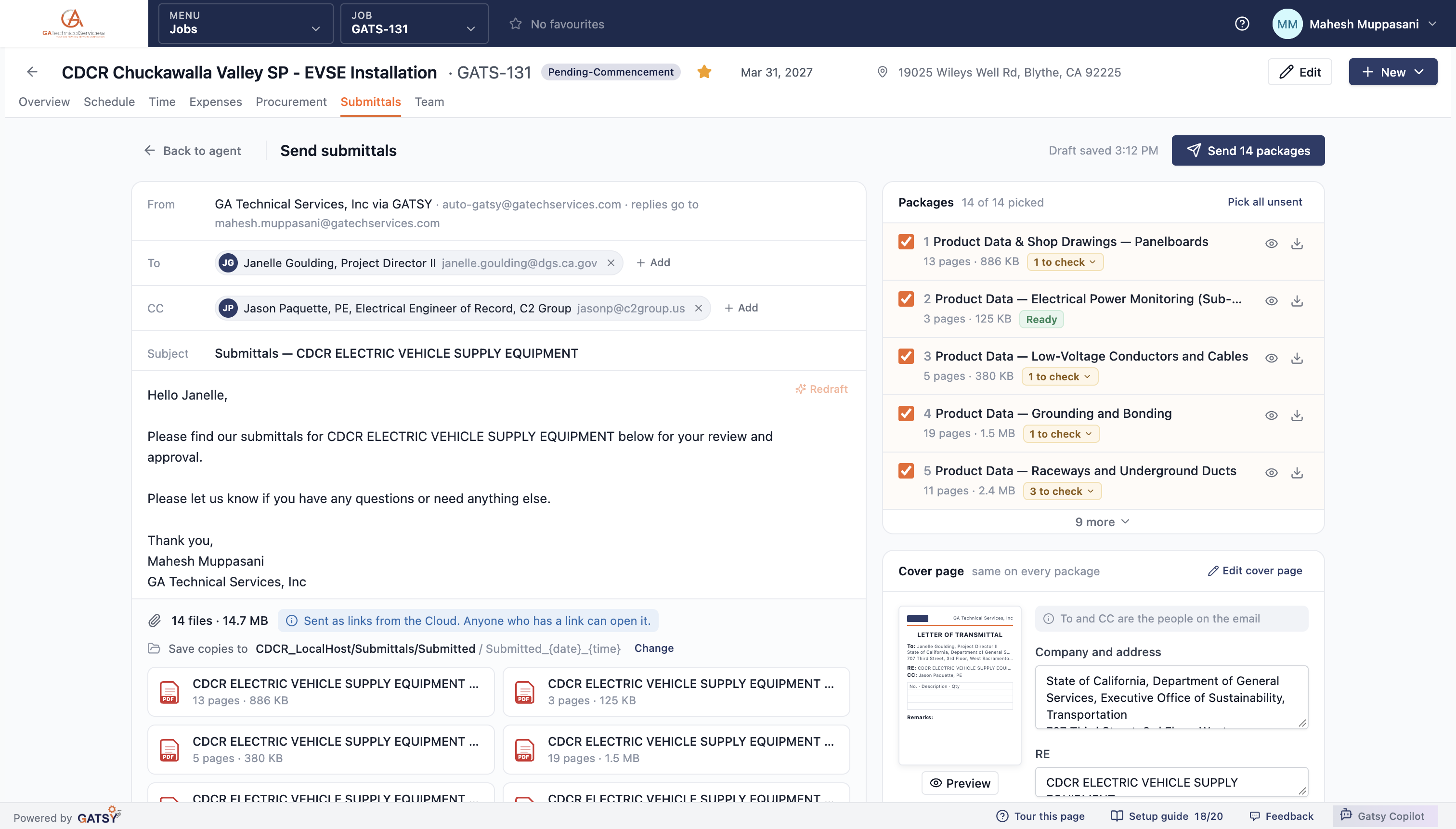
To and CC already filled from the cover page, a subject built from the job, and a covering note you can rewrite — or have redrafted.

Pick what goes in this send

All fourteen, or just the ones that are ready. Each package shows its page count, its size and whether it still has anything to check.

Sent as links, saved to the Cloud

Packages go as Cloud links rather than a 15 MB attachment, and a copy of exactly what you sent is filed into the job’s own Submitted folder, named with the date.

Nothing goes out on its own

The agent builds, flags and drafts. A person presses send — always.

The send screen with the drafted email, the fourteen packages picked and the Cloud folder copies are saved to

How a submittal package gets built

  1. 1

    Point it at the job folder

    Pick the project’s folder on your Cloud drive once. The agent reads the bid documents in it.

  2. 2

    It builds the register

    Every product, with manufacturer, model, spec reference and whether it complies, is an equal, or deviates.

  3. 3

    Review what it flagged

    Each package lists what to check. Answer its questions in the chat; correct anything in plain language.

  4. 4

    Send and file

    A drafted email, packages as Cloud links, and a copy saved back into the job’s Submitted folder.

Questions contractors ask

Where does it get the products from?

The bid documents on the job — the specs, the drawings and the project manual you already uploaded or keep in the job’s Cloud folder. It reads those, not a generic catalogue.

What if it cannot find a data sheet?

It says so on the package, under "check before sending", rather than sending an incomplete package or inventing a part number. You can attach the sheet yourself and tell it to use that one.

Can it send to the customer without me?

No. It builds the packages, flags what to check and drafts the email. A person presses send, every time.

What does the customer receive?

One file per spec section — a letter of transmittal followed by the data sheets — sent as Cloud links, with a copy filed back into the job’s own Submitted folder.

Does it need our Cloud drive connected?

Yes. The agent works from the project’s folder: it reads the bid documents in it and files what you send back into it. You pick that folder once per job.

Ready to run every job in one place?

Start your 30-day free trial today. No credit card, no setup fee, and we’ll get GATSY configured around how your business already works.

GATSY AI estimating workspace showing a priced project takeoff
30-day Free TrialNo Credit Card RequiredCancel Anytime
View Manual